
Download p7zip – Free command‑line compression tool for macOS
Overview
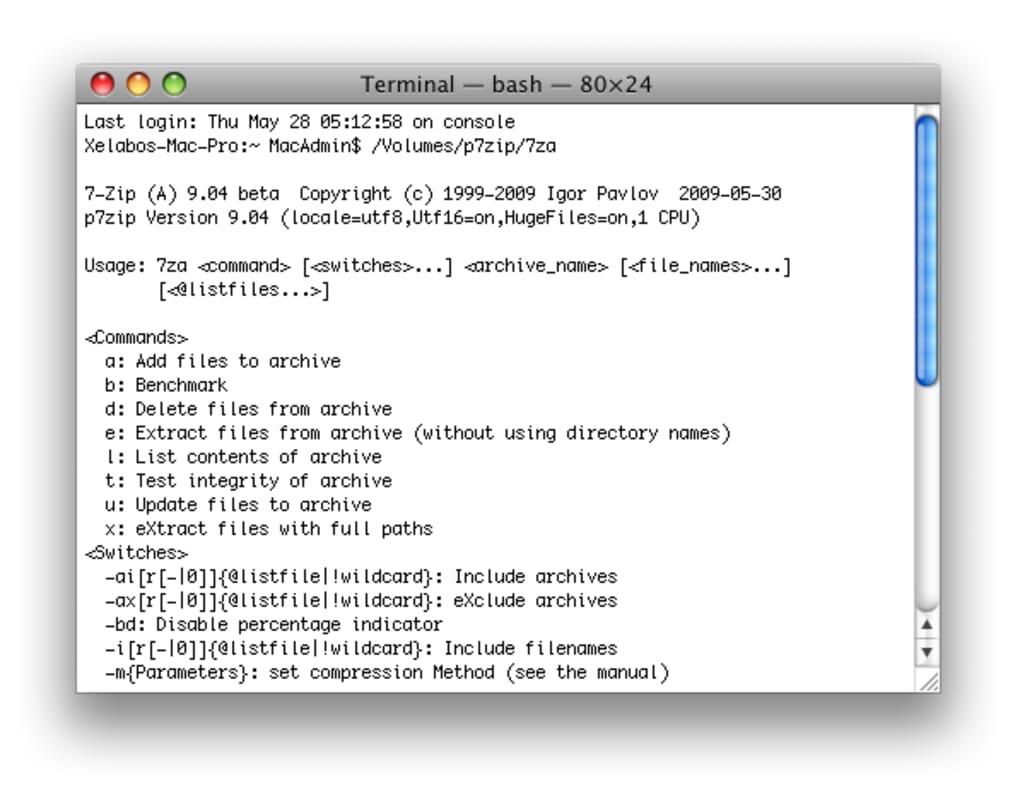
p7zip is the macOS port of the legendary 7‑Zip compression engine, delivering a powerful, open‑source solution for creating, extracting, and managing archives directly from the Terminal. Unlike many consumer‑grade archivers that rely on graphical user interfaces, p7zip operates entirely through command‑line instructions, giving power users granular control over compression parameters, batch processing, and scripting. This makes it an ideal companion for developers, system administrators, and anyone who prefers automation over clicking through menus. Although p7zip itself lacks a native GUI, the community‑supported front‑end Ez7z provides a lightweight graphical wrapper for those who are less comfortable with raw shell commands. p7zip supports an impressive array of formats—7z, ZIP, TAR, GZIP, BZIP2, XZ, and many more—allowing you to compress or decompress virtually any archive you encounter on macOS. Its small footprint, regular security updates, and zero‑cost licensing make it a secure, reliable choice for everyday file management, backup scripts, or large‑scale deployment pipelines.
Key Features & Capabilities
- Support for over 20 compression and archive formats, including 7z, ZIP, TAR, GZIP, BZIP2, XZ, LZMA, and RAR (read‑only).
- High‑compression algorithms (LZMA2, PPMd, BZIP2) that often outperform native macOS zip utilities.
- Command‑line driven workflow enabling batch processing, scripting, and integration with CI/CD pipelines.
- Full control over compression level, dictionary size, solid block size, and multithreading for optimal performance on modern CPUs.
- Ability to create self‑extracting archives (SFX) for Windows compatibility.
- Secure encryption options (AES‑256) for password‑protected archives.
- Archive testing and verification tools to ensure data integrity after compression or transfer.
- Compatibility with the Ez7z graphical front‑end for users preferring a point‑and‑click interface.
- Open‑source licensing (GNU LGPL) guaranteeing free updates and community support.
- Lightweight installation footprint (under 5 MB) with no additional runtime dependencies.
Installation, Usage & Compatibility
Getting p7zip up and running on your Mac is straightforward. The most common method is via Homebrew, the popular macOS package manager. Open Terminal and run:
/bin/bash -c "$(curl -fsSL https://raw.githubusercontent.com/Homebrew/install/HEAD/install.sh)"Once Homebrew is installed, execute:
brew install p7zipThis command downloads the latest stable version, resolves dependencies, and places the 7z and 7za binaries in /usr/local/bin (or /opt/homebrew/bin on Apple Silicon). After installation, verify the version with:
7z --versionBasic usage examples:
- Compress a folder:
7z a archive.7z /path/to/folder - Extract an archive:
7z x archive.7z -o./output - List contents:
7z l archive.zip - Test integrity:
7z t archive.7z
p7zip is compatible with macOS 10.13 (High Sierra) and later, including both Intel and Apple Silicon (ARM) architectures. Because it runs as a native command‑line binary, it works seamlessly in any terminal emulator (Terminal, iTerm2, Zsh, Bash, Fish). For users who prefer a GUI, the separate Ez7z application can be downloaded from the same Homebrew tap or directly from its GitHub releases page. Once installed, Ez7z automatically detects the p7zip binaries and offers drag‑and‑drop compression, extraction, and archive preview features.
Pros & Cons
Advantages
- Extensive format support eliminates the need for multiple tools.
- Command‑line interface enables automation, scripting, and integration with development workflows.
- High compression ratios, especially with 7z and LZMA2 algorithms.
- Free, open‑source, and regularly updated for security and compatibility.
- Lightweight footprint with minimal system impact.
Drawbacks
- Lack of a native graphical interface can be intimidating for beginners.
- Complex command syntax may require learning curve for advanced options.
- Encryption support is limited to archive‑level passwords (no file‑level encryption).
- RAR extraction is read‑only; creation of RAR archives is not supported.
- Performance gains are hardware‑dependent; older CPUs may see marginal improvements over built‑in zip.
Overall Verdict: p7zip delivers a robust, free compression suite for macOS power users. Its command‑line nature is both a strength and a hurdle, but when paired with Ez7z, it becomes accessible to a broader audience. The high compression efficiency and extensive format list make it a must‑have tool for developers, sysadmins, and anyone dealing with large data sets.
Frequently Asked Questions
Can p7zip replace the built‑in macOS zip utility?
Yes. p7zip supports the ZIP format and offers higher compression options than the default macOS zip tool. It also provides additional features such as solid compression, multi‑threading, and stronger AES‑256 encryption.
Is p7zip safe to use on sensitive data?
Absolutely. p7zip uses the industry‑standard AES‑256 encryption for password‑protected archives. As an open‑source project, its code is publicly audited, and regular updates address any security concerns.
Do I need Administrator privileges to install p7zip?
When installing via Homebrew, you may be prompted for your macOS password to write to system directories. After installation, using p7zip does not require elevated privileges unless you are accessing protected files.
Can p7zip create self‑extracting archives for Windows?
Yes. By using the 7z sfx command, you can generate Windows‑compatible self‑extracting executables that unpack without requiring external software.
What is the best way to automate backups with p7zip?
Create a shell script that runs 7z a -t7z -mx9 backup.7z /path/to/data and schedule it with launchd or cron. The script can include verification steps using 7z t to ensure archive integrity.
Conclusion & Call to Action
p7zip stands out as a free, high‑performance compression engine for macOS users who value flexibility, scriptability, and broad format compatibility. While the lack of a built‑in graphical interface may deter casual users, the optional Ez7z front‑end bridges that gap without sacrificing power. Whether you’re compressing large log files, packaging software releases, or automating nightly backups, p7zip offers the tools you need to do it securely and efficiently.
Ready to boost your archive workflow? Download p7zip via Homebrew today, or grab the Ez7z GUI for a more visual experience. Experience faster, smaller archives and take control of your file management—download now!







